5 Real-Life Database Examples (With Templates You Can Use Today)

Discover the Everyday Value of Databases: 5 Real-Life Examples Explained
Almost every business or organization uses a database, whether for managing customers, tracking inventory, or analyzing financial performance. Despite their widespread use, the concept of a database can seem abstract or overly technical to those without a technical background. This can make it challenging to understand how databases add value to day-to-day operations.
To bridge this gap, we’ve compiled five real-life database examples that showcase their practical applications. Each example highlights a specific use case, from customer management to workflow automation, demonstrating how databases help businesses stay organized, efficient, and data-driven.
Whether you’re a small business owner or part of a larger organization, these examples will show how a well-structured database can improve decision-making, save time, and even unlock new opportunities.
And here is what has changed: you no longer need to design a database schema, map fields, or write code to get there. With Five’s AI assistant, V, you describe the database application you need and V builds it — a real, working web application with a proper MySQL database, search, permissions, and reporting included. The five examples below are not just illustrations of what databases do. They are blueprints you can prompt V to build today.
What Is a Database?
Think of a database as a digital filing system. It stores information so you can access, update, and manage it easily.
Database vs Spreadsheet
Capacity: Spreadsheets struggle with large datasets. Databases handle massive amounts of data without slowing down.
Accessibility: Multiple users can update a database at the same time without causing errors.
Insights: Databases offer powerful reporting tools to help you make data-driven decisions.
The old objection to databases was that building one took time and technical skill. That objection no longer holds. With Five’s AI assistant, V, you describe the database application you need in plain language and V generates a real, working web application — proper MySQL database, search, permissions, and reporting included. The five examples below are the most common starting points.
5 Real-Life Database Examples
Here are five common database examples that are widely used in real-world businesses. These databases help manage customer information, inventory, suppliers, HR records, and accounting data. For each one, we have included the template guide you can follow, and a note on how V can build it from a prompt.
1. Customer Database
A customer database is a centralized system used to store, manage, and organize information about a business’s customers. It typically includes details such as contact information, purchase history, preferences, and interactions. It helps businesses improve customer relationships and make data-driven decisions.
By using a customer database, businesses can store and organize customer data systematically. They can also make the data easily accessible for various purposes such as marketing, sales, and customer service.
By maintaining a comprehensive customer database, businesses can gain insights into their customer base. This enables them to tailor their products, services, and communications to meet customers’ needs and preferences.
In essence, a customer database serves as the backbone of effective customer relationship management. That’s why customer databases are also sometimes referred to as customer relationship management or CRM systems.
How V builds it: Describe the customer database you need to V — contact details, purchase history, preferences, interactions — and V generates a working web application with a MySQL database, search, forms, permissions, and reporting. If you already have customer data in a spreadsheet, attach the file to your prompt and V will read it and populate the database for you.
Customer Database Template
Ready to build your own customer database? Follow this simple 3-step guide to get started with creating a professional and efficient solution tailored to your needs.
Customer Database Schema
Below is a customer database schema that outlines how you can structure and store key information about your customers, including personal details, purchase history, and preferences. This schema serves as a foundation for creating a well-organized and efficient customer database that you can customize to meet your specific business needs.
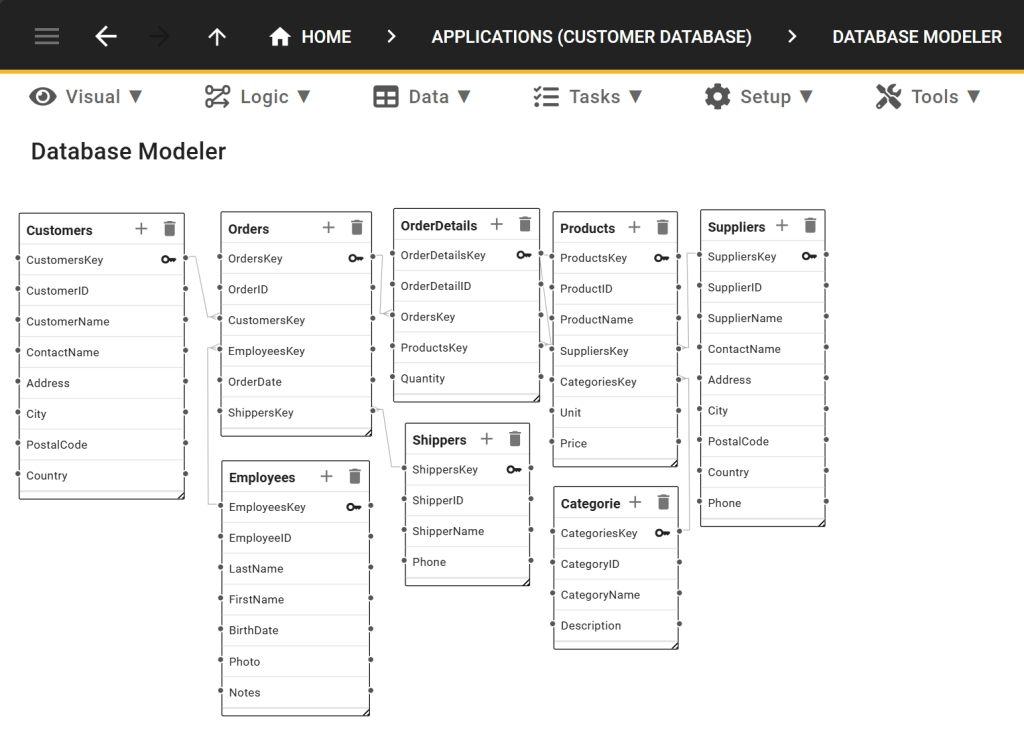
You do not have to design this schema by hand. Five’s visual database modeler lets you adjust tables, fields, and relationships with GUID primary and foreign keys — and V can generate the initial structure from a prompt.
2. Inventory Database
An inventory database is a specialized system designed to store and manage detailed information about the items in your inventory and another popular real-life database example.
At its simplest, it tracks basic details like item names and quantities. For businesses with more complex needs, an inventory database can expand to include a wide range of attributes, such as product dimensions, weight, color, material, size, country of origin, or packaging specifications.
The true value of an inventory database lies in its functionality as a centralized and searchable resource. It enables businesses to efficiently manage stock levels, monitor item details, and ensure accurate tracking. This makes it a critical tool for maintaining operational efficiency, optimizing inventory levels, and improving decision-making.
How V builds it: Tell V what you need to track — item names, quantities, dimensions, supplier details, stock thresholds — and V builds a working inventory application with a MySQL database, search, filters, and role-based access. If your stock list already lives in Excel or Google Sheets, attach the file to the prompt and V will read it and populate the database with your existing records.
Inventory Database Template
Ready to build your own inventory database? Follow this simple 3-step guide to get started with creating a professional and efficient solution tailored to your needs.
3. HR Database
Unless you are a solo entrepreneur, managing employee information is a critical aspect of running a business. An HR database serves as a centralized system to store, organize, and access key details about your workforce. From basic information such as names, contact details, and job titles to more complex data like employment history, benefits, certifications, and performance reviews, an HR database consolidates everything in one accessible place.
This database helps streamline HR processes, ensuring compliance, supporting workforce planning, and providing insights for decision-making. Whether tracking leave balances, managing payroll details, or monitoring training progress, an HR database is an essential tool for efficient employee management and fostering a productive workplace.
How V builds it: Describe the HR application you need — employee records, job titles, leave balances, certifications, performance reviews — and V generates a working web application with a MySQL database, search, and permissions. Because Five includes role-based access control, SSO/MFA, and logs out of the box, an HR tool built with V starts with the access control that employee data requires. Audit trails and history tables are created automatically for every table.
HR Database Template
Ready to build your own HR database? Follow this simple 3-step guide to get started with creating a professional and efficient solution tailored to your HR needs.
4. Supplier Database
A supplier database is a centralized system to store and manage vital information about your vendors. This can include fundamental details like supplier names, contact information, contract terms, and pricing agreements, as well as operational specifics such as delivery schedules, minimum order quantities, and payment terms.
Depending on your industry, a supplier database can also track specialized attributes, such as compliance certifications (e.g., ISO-certified, fair trade), product quality ratings, and lead times. It may also flag strategic partnerships or agreements, like “exclusive supplier” or “preferred vendor” status.
By maintaining this information in a searchable database, businesses can efficiently evaluate supplier performance, ensure compliance, and build more reliable supply chains.
How V builds it: Tell V which supplier attributes matter to you — contact details, contract terms, certifications, lead times, preferred vendor status — and V builds a working supplier application with a MySQL database, search, filters, and permissions. As your supplier list grows and your requirements change, you can keep refining the application by describing the change to V, editing the code directly, or adjusting the schema in Five’s visual database modeler.
Supplier Database Template
Ready to build your own supplier database? Follow this simple 3-step guide to get started with creating a professional and efficient solution tailored to your supplier management needs.
5. Accounting Database
An accounting database is used to manage financial transactions, records, and reports for a business. It stores crucial data such as income, expenses, invoices, payroll, and balance sheets, enabling businesses to maintain an accurate and up-to-date financial overview.
For small businesses or larger enterprises, an accounting database helps automate processes like invoicing, expense tracking, and tax calculations, ensuring compliance and financial transparency. By centralizing all financial data, it also simplifies auditing, improves accuracy, and helps businesses make more informed financial decisions. Additionally, accounting databases can integrate with other systems, such as banking or inventory management, to streamline operations.
How V builds it: Describe the accounting application you need — invoices, expenses, payroll, balance sheets, reporting — and V generates a working web application with a MySQL database, search, and reporting. Financial tools need a clear record of what changed and who changed it, which is why Five creates audit trails and history tables automatically for every table. Access can be restricted by role, and SSO/MFA is built in.
Accounting Database Template
Ready to build your own accounting database? Follow this simple 3-step guide to get started with creating a professional and efficient solution tailored to your accounting needs.
Build Your Own Database Application
These 5 real-world database examples illustrate the importance of databases in business management and day-to-day operations. Almost every aspect of business is better managed with a custom database in place.
What has changed is how quickly you can build one. With Five’s AI assistant, V, you describe the database application you need in plain language and V generates a real, working web application — proper MySQL database, search, permissions, and reporting included.
Here is how it works:
- Describe it. Tell V what internal tool you need — a customer database, an inventory tracker, an HR system, a supplier register, an accounting application. Use your own words.
- Attach your data. If your records already live in Excel or Google Sheets, attach the spreadsheet directly to the prompt. V reads the file, understands its structure, and uses it as the foundation for the application.
- V builds it. V generates a real, working web application with a MySQL database, forms, search, filters, permissions, and reporting. Your data is imported, so the application starts populated.
- Refine it. Keep describing changes to V in natural language. Add calculated fields, adjust how data is displayed, add login screens, or restrict records by role.
- Maintain it your way. Five gives you three maintenance paths — AI, code, or GUI — so you can use whichever fits the change you need to make. The visual database modeler is there when you want to adjust tables, fields, and relationships directly.
Every application V builds comes with built-in MySQL and hosting, up to three environments (development, testing, and production, depending on your plan), role-based access control, SSO/MFA, logs, and automatic audit trails and history tables. You are not assembling a stack. You are describing a tool and getting a production-ready application back.
Whether you’re building a customer, HR, or inventory database, the path from idea to working software is now a prompt. Get started with Five today and take the first step towards building a custom database application that works perfectly for your business.
Five has a team of experts ready to assist you with your database development. So, if you ever feel like you’re in over your head, don’t worry, our expert developers are here to help. And yes, we promise not to charge you an arm and a leg or leave you with a system that only we understand.
To get a free consultation, visit this page: “Hire An Expert.”